Never miss a deal again

The Coupon Expiration Checklist

Check the details, choose a reminder date, and create an ICS calendar file you can add to Google Calendar, Apple Calendar, Outlook, or your phone.

Free to use. No account required.

0 of 5 completed
Your unfinished checklist was restored on this device.

Coupon Expiration Checklist

couponcue.com/tools/coupon-expiration-checklist


Add the issuer so your summary and calendar reminder are easy to recognize.

Checklist progress 0 of 5 completed

What is the coupon worth?

Select the offer type

Enter a number between 1 and 100.

Enter the dollar amount off.

Leave blank for a generic free item.

Enter the store credit value.

When does it expire?

Select the expiration type

Select the date printed on the coupon.

The date the coupon was given or activated.

Number of days valid.

Review the coupon's fine print before relying on it. Look for phrases like "expires 30 days after issue" or a printed expiry stamp.

Which restrictions apply?

Select all that apply

This code stays on your device and is not shared.

Keep this short. This note stays on your device.

Review the coupon's fine print before relying on it.

How will you redeem it?

Select all redemption methods that apply

Stored on this device only. Not shared.

When would you like to be reminded?

Complete the End Date section first to see personalized reminder options.

Your calendar will use your local timezone.

Choose any upcoming date.

Your data stays on this device. The reminder is added to your personal calendar.

What is hardest about keeping track of coupons?

Thanks for sharing — it helps us improve Coupon Cue.

Coupon Readiness Summary

Not started
Brand Add the brand or store.
Value Select the offer type to begin.
Expiration Add the expiration date.
Restrictions Review the coupon's fine print. Restrictions noted
    How to use Add the redemption methods so you know what to do at checkout.
    Reminder Set a reminder in section 5.
    Save This in Coupon Cue

    Add an expiration date and reminder before creating a calendar event.
    Free to use. Works in seconds. No sign up required.

    Why coupons go unused

    • Forgot the expiration date
    • Missed the fine print
    • Didn’t plan ahead
    • Couldn’t find it in time

    How to read restrictions

    • Look for minimum purchase amounts
    • Check if it’s in-store, online, or both
    • Note brand, item, or category exclusions

    When should you set a coupon reminder?

    • 7 days before: plan your trip
    • 3 days before: don’t forget
    • 1 day before: last call alert

    Turn a coupon expiration date into a calendar reminder

    A coupon is only useful if you remember it before the deadline. This checklist helps you move from "I should use that someday" to a specific reminder on your calendar.

    The tool works like a simple expiration date calculator. Once it knows when the offer ends, it helps you pick a reminder that gives you enough time to shop, compare restrictions, or place an online order. For a routine coupon, that may be a few days before expiration. For store credit, rewards cash, or a high-value offer, an earlier reminder is usually smarter.

    When your checklist is complete, select Add to Calendar to download an ICS calendar file. An ICS file is a standard event file used by major calendar apps. Coupon Cue fills it with your coupon name, reminder date, expiration details, restrictions, and redemption notes, so the event is useful when the notification appears.

    If you are trying to add the reminder to Google Calendar, download the file first. On many phones and computers, opening the file will offer to add it to your calendar. You can also use Google Calendar's import option if you prefer the manual route. In plain terms, the "Google Calendar add ICS" workflow is: create the reminder here, download the file, then open or import it in Google Calendar.

    Reminders for Google Calendar

    Create a coupon reminder without making an account. The downloaded event can be opened or imported so Google Calendar can notify you before the coupon expires.

    ICS calendar file

    The tool creates a portable .ics file, not a proprietary reminder. That makes it useful across Google Calendar, Apple Calendar, Outlook, and other apps that support the calendar ICS file format.

    Expiration date calculator

    Use the coupon's expiration date to choose a practical reminder window. The right date is early enough to act, but close enough that the offer stays top of mind.

    Why coupons go unused

    Most people intend to use their coupons. The problem is rarely motivation — it is logistics. Understanding the pattern can help you break it.

    The expiration date slips by

    Without a reminder, even the best intentions do not translate into action before the offer expires.

    The coupon can't be found

    A screenshot buried in your camera roll or a paper coupon in the wrong drawer is practically invisible when you need it.

    Restrictions cause rejection

    Arriving at checkout with a coupon that does not apply to your cart wastes time and creates an awkward moment.

    The purchase happens without it

    You remember the coupon only after the purchase is complete. The checklist habit puts the coupon top of mind before you shop.

    How to read coupon restrictions

    The fine print determines whether a coupon works at checkout. Here is what to look for.

    This is general guidance only and not legal or financial advice.

    • Minimum purchase amounts. The total must meet a threshold before the discount applies. Check whether the minimum is before or after other discounts.
    • Product or category exclusions. Sale items, clearance, gift cards, and certain brands are commonly excluded even when the coupon appears broad.
    • In-store versus online. Many coupons only work in one channel. Verify before you plan a trip or fill a cart.
    • One-use rules. Per-customer limits mean a coupon cannot be used again once redeemed, even across separate visits.
    • Stacking restrictions. "Cannot be combined" means the coupon will not apply alongside another offer, loyalty discount, or sale price.
    • Location requirements. Franchise and regional promotions may only apply at specific locations within a chain.
    • Membership requirements. Some coupons only activate when you are logged into a loyalty account or rewards program at checkout.

    When to set a coupon reminder

    The best reminder date is your next realistic opportunity to use the coupon — not necessarily the expiration date itself.

    Time remainingSuggested reminderWhy
    31 or more days14 days before expirationGives you time to plan a shopping trip or order online.
    8 to 30 days7 days before expirationA week is enough for most routine purchases.
    4 to 7 days3 days before expirationShort enough to stay top of mind for a near-term shopping trip.
    2 to 3 days1 day before expirationTriggers action the next morning when the need is still fresh.
    Today or tomorrowTodayUse it now or it will be gone.
    High-value or plannedEarlier than typicalStore credit, rewards, and deferred-interest offers warrant extra lead time to coordinate purchases.

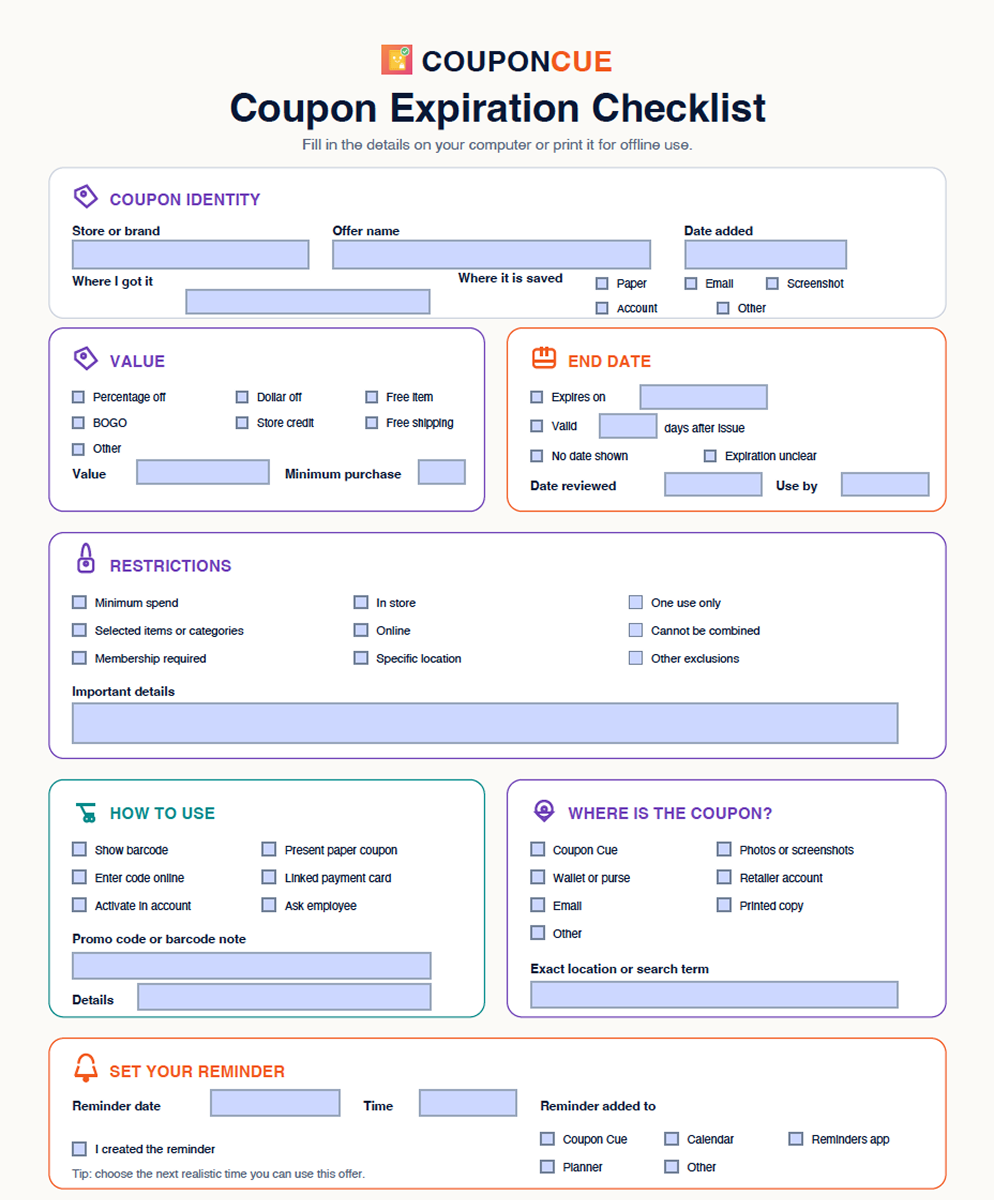
    Printable Checklist

    Download the fillable checklist and never miss a coupon detail again.

    Download Checklist

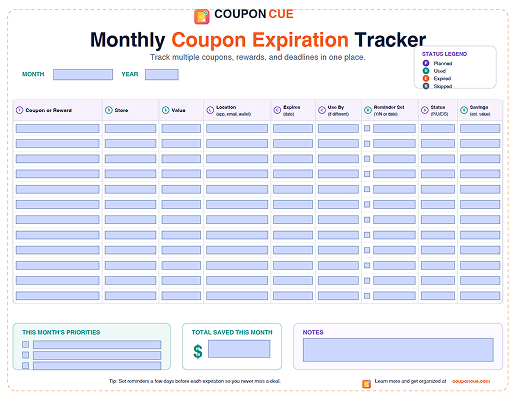
    Monthly Coupon Expiration Tracker

    Download the fillable monthly tracker to plan coupon deadlines at a glance.

    Download Tracker

    Frequently asked questions

    Coupons often have restrictions that cause them to be declined at checkout. Verifying the value, expiration date, restrictions, and redemption method before you shop prevents disappointment, wasted trips, and the awkward moment of having to put items back. A quick review takes less than a minute and protects the value you already have.

    Record five things: the offer type and amount, the expiration date, any restrictions such as minimum purchase or product exclusions, the redemption method such as a barcode or promo code, and a reminder date timed to your next realistic shopping opportunity.

    Many coupons without a printed expiration date do eventually become invalid. Look for phrases like "while supplies last," "offer may end without notice," or a campaign end date in the accompanying email or flyer. If you still cannot determine validity, contact the issuer directly. Treat these coupons as short-term opportunities and plan to use them within a few weeks.

    Set a reminder when you have a realistic opportunity to use the coupon. For most everyday purchases, 7 days before expiration works well. For planned purchases or high-value offers like store credit or rewards, set a reminder 14 days or more in advance so you have time to coordinate. The goal is to be reminded before the deadline, not on it.

    Yes. After completing the checklist and selecting a reminder date in section 5, click "Add to Calendar." The tool generates a standard ICS calendar file that works with Google Calendar, Apple Calendar, Outlook, and most other calendar apps. No account or sign-up is required.

    Complete the checklist, choose a reminder, and download the .ics file. On many devices, opening the file prompts you to add it to your calendar. If you want to import it manually, open Google Calendar, go to Settings, choose Import and export, and upload the ICS calendar file.

    The calendar ICS file format is a common way to share calendar events between apps. For this checklist, the file includes the coupon reminder title, reminder date and time, expiration details, redemption notes, and a link back to the checklist page.

    Keep both types in one place so no offer is forgotten. Paper coupons can be photographed or scanned. Digital coupons from emails or apps can be saved as screenshots. Grouping them in a single system, whether a folder, app, or checklist, means you only have one place to check before every shopping trip.

    A coupon is a specific discount applied at checkout against a qualifying purchase. A reward is earned through a loyalty program and is typically credited to your account after meeting a threshold. Store credit is a balance the retailer holds for you, often from a return or promotional event. All three expire if unused and are worth tracking before the deadline passes.

    The Coupon Cue iOS app lets you save coupons and set customized reminders by date, time, and location. Once saved, the app sends a notification at your chosen time so you never have to check manually. Download Coupon Cue from the App Store to organize and remember coupons automatically on your iPhone.
    Coupon Cue logo

    Don't rely on memory for the last step.

    Coupon Cue keeps the offer, expiration date, redemption details, and reminder together so you can act before the value disappears.

    Download Coupon Cue on the App Store